Campaign Lifecycle Flow for v3
# Campaign Lifecycle Flow for v3  1. Creating a campaign starts with the user scheduling which devices with proper make, model and current software prerequisites need to be updated with which software including a start and end date. 2. Once the user schedules a campaign request, the campaign changes to “Request Pending” status - After passing parameter checks, campaign status typically moves to "Queued" status. - If parameter checks fail, it moves to "RequestFailed" and may bypass "Pending." Checks could include eligibility such as licenses, FOTA capable, prerequisites or timing checks. 3. The system performs network checks on the devices. Once the network checks are complete, it moves to pre-scheduled. 4. ThingSpace creates sub-campaigns if necessary. Once the sub-campaigns are created, it moves to “scheduled.” The campaign stays in "Scheduled" status during the device update. 5. Once the campaign end date has been reached or if all eligible devices have been upgraded, the campaign status moves to “ended.” After you send a request to schedule an upgrade, the upgrade advances through several states: - CampaignRequestPending: The upgrade request has been accepted but is not scheduled yet. - If any parameter checks fail, the state changes to CampaignRequestFailed. - CampaignQueued: The upgrade request has passed a campaign eligibility check and campaign parameters validation. The upgrade is in the queue waiting to be scheduled. - You can cancel the campaign if it is in Queued status and if it is before the Start Date, which becomes CampaignCancelled state. - You can delete the campaign after the start date, which becomes CampaignAborted state. - CampaignFailed: The campaign scheduling API call has failed. - CampaignPreScheduled: Assuming devices are reachable but the campaign has not been scheduled yet, the campaign is in “PreScheduled” status. - CampaignScheduled: The upgrade is scheduled. This appears before the campaign start date. - After the start date has passed and the upgrade is in progress you can abort the campaign. Some devices may have already started or completed the upgrade. Upgrades on remaining devices might not complete the upgrade. - CampaignEnded: The campaign end date has passed. No more devices are allowed to upgrade if they have checked in before the campaign end date. ## Device Lifecycle Flow for LWM2M Devices using the /v3 Resource Path 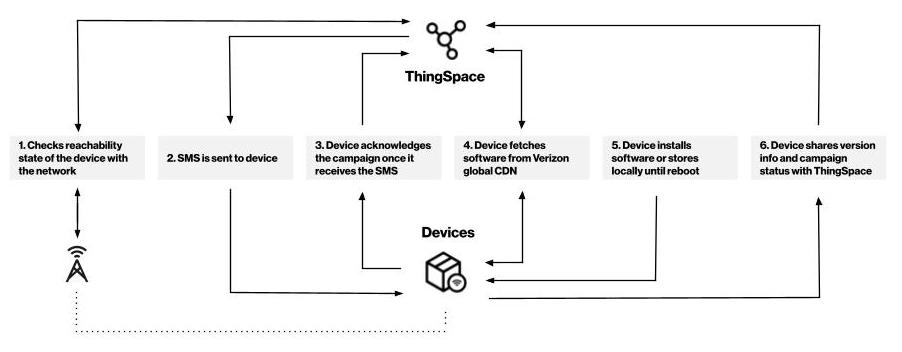 ## Status and Error Messages for LWM2M Devices using the /v3 Resource Path | Status | Reason | | --------------------------------- | ----------------------------------------------------------------------------------------------------------------------------------------------------------- | | **NoDeviceDataFromNetwork** | The network reports this device is not reachable. | | **ReceivedDeviceDataFromNetwork** | Reachability information received from the network. | | **RequestToFotaServerFailed** | Request to FOTA server failed, estimated retry time on 09 Jul 21 00:00 UTC. **Note:** time in RFC822 format | | **UpgradePending** | Upgrade pending, the device upgrade is estimated to be scheduled for 09 Jul 21 00:00 UTC. **Note:** time in RFC822 format | | **UpgradeScheduled** | The upgrade is scheduled to begin on 09 Jul 21 00:00 UTC, and the estimated completion is 09 Jul 21 04:00 UTC **Note:** time in RFC822 format | | **NoDeviceDataFromNetwork** | The network does not report this device is reachable, no retry available, try count 42. **Note:** “try count” is an integer value | | **ReceivedDeviceDataFromNetwork** | Reachability information received from the network, try count 42. **Note:** “try count” is an integer value | | **UpgradeFailed** | Campaign completion check failed due to system error with FOTA server, next estimated time to check on 09 Jul 21 00:00 UTC. **Note:** time in RFC822 format | | **UpgradeFailed** | Upgrade failed, try count 42. **Note:** “try count” is an integer value | | **UpgradeFailed** | Upgrade failed, processing is not allowed after campaign end date 09 Jul 21 00:00 UTC. **Note:** time in RFC822 format | | **UpgradeFailed** | Upgrade failed, all attempts are exhausted, try count 42. **Note:** “try count” is an integer value | | **UpgradeSuccess** | Upgrade completed successfully. |

