Simulator Environment
# Simulator Environment ## Overview To utilize a ThingSpace API, you must [sign up/register](https://thingspace.verizon.com/profile/sign-up.html) to generate your own API keys. To execute an API request requires users to have an [API token (bearer token) and a session token.](https://thingspace.verizon.com/documentation/api-documentation.html#/http/quick-start/credentials-and-tokens) However, to obtain credentials, the user requires a Verizon Business or Marketplace Account. This Simulator environment eliminates all previous prerequisites, enabling all users to test out the ThingSpace API within the [Guided Walkthroughs](https://thingspace.verizon.com/documentation/api-documentation.html#/http/guided-walkthroughs/iot-how-to-s/overview) without the need for Verizon Business or Marketplace Account. To do this please follow the steps below: - The first step to achieving successful API calls is to generate tokens in the simulator environment. To achieve this, visit the [How to Obtain Tokens Guided Walkthrough](https://thingspace.verizon.com/documentation/api-documentation.html#/http/guided-walkthroughs/how-to-obtain-tokens). - Follow Step 1 to Get Access Token, then in Step 2 Get Session Token, press the Configure button displayed below.  - Select the `Mock server` option from the Environment dropdown. 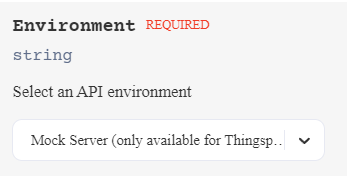 - You can now proceed to the `Authentication` section and click on `Get Token` button. **Note:** _User does not need to provide a valid OAuthClientId and OAuthClientSecret in case they are using the `Mock Server` Environment_ - The test token will be saved automatically and will be used in all the future api calls from here onwards. The token in the curl command will look similar to the following example: `-H 'Authorization: Bearer 1f12495f1a1ad9066b51fb3b4e456aee'\ ,` - Users can now start executing API requests and can see responses from the simulator. The responses will provide a view of API use and how request/response works for that API. There is a [Guided Walkthrough for How to Activate a Device](https://thingspace.verizon.com/documentation/api-documentation.html#/http/guided-walkthroughs/iot-how-to-s/guided-walkthroughs/how-to-activate-a-device). This walkthrough has several steps and each steps has its own corresponding API. The first step is to Register Callback. The user has to register their service in order to get an async response but, using a simulator environment, there is no need to register an actual callback listener url. Instead, there is a url provided for use: `https://mock.thingspace.verizon.com/webhook` This simulated async response will provide a view of what an actual listener service response will look like. To view the simulated async response, use the following url: `https://mock.thingspace.verizon.com/display?accountName={accountName}` The `accountName` query parameter value is the value you provide in the **Register Callback Section.** This is handy if you can't retrieve your account data. The simulator allows the use of this default account data. The simulated async response will be kept for 10 mins only, requiring the user to trigger a new request to see the output. For step 1 if you don't provide account name in request, we are making an exception. you can still view the async response data by using the following url: `https://mock.thingspace.verizon.com/display` Please provide test account name from step 1 to step 6 to get better mock response data experience and avoid any exceptions. Please ensure that at least one required parameter is provided in the POST request body. For example either `accountName`, `deviceId`, or a empty request body like the Example Request below: ```html curl -X POST \ --url 'https://mock.thingspace.verizon.com/api/m2m/v1/devices/actions/list' \ -H 'Accept: application/json' \ -H 'VZ-M2M-Token: VZ-M2M-Token' \ -H 'Content-Type: application/json' \ -H 'Authorization: Bearer 1f12495f1a1ad9066b51fb3b4e456aee' \ --data-raw '{}' ``` ## Simulator Requirements for Hyper Precise Location Service **Note:** _In order to get different response status code in the Simulator Enviorment, please use below suggested value for its respective api endpoints_ For the below API endpoint please use below imei value to get different status code: | imei value | Status code | |------------|-------------| | imei1 | 400 | | imei2 | 401 | | imei3 | 403 | | imei4 | 404 | | imei5 | 409 | | imei6 | 500 | [`GET /devices/services`](/docs/specialized-apis/hyper-precise-location/api-endpoints/device-service-management-for-hyper-precise/get-service-status/getdevicehyperprecisestatus) Shows device status for Hyper Precise Location. [`PUT /devices/services`](/docs/specialized-apis/hyper-precise-location/api-endpoints/device-service-management-for-hyper-precise/update-service-status/updatedevicehyperprecisestatus) Enable/disable Hyper Precise Location. [`POST /report/aggregate`](/docs/specialized-apis/hyper-precise-location/api-endpoints/device-reports-for-hyper-precise-feature-usage/aggregate-usage-report-synchronous/calculateaggregatedreportsynchronous) An aggregated sessions and usage report for a user specified selection of devices and date range (synchronous). [`POST /report/async/aggregate`](/docs/specialized-apis/hyper-precise-location/api-endpoints/device-reports-for-hyper-precise-feature-usage/aggregate-usage-report-asynchronous/calculateaggregatedreportasynchronous) An aggregated asynchronous sessions and usage report for a user specified selection of devices and date range. [`POST /report/sessions`](/docs/specialized-apis/hyper-precise-location/api-endpoints/device-reports-for-hyper-precise-feature-usage/session-usage-report/getsessionsreport) A daily usage report for a single device for a specified date range (up to 180 days). **Note:** _Please use below example TestAccount value for below api endpoint to get different status code:_ | Account value | Status code | |---------------|-------------| | TestAccount-1 | 400 | | TestAccount-2 | 401 | | TestAccount-3 | 403 | | TestAccount-4 | 404 | | TestAccount-5 | 409 | | TestAccount-6 | 500 | [`GET /callbacks/callbacks`](/docs/standard-apis/connectivity-management/api-endpoints/connectivity-callbacks/list-registered-callbacks/listregisteredcallbacks) Get registered callback listeners. [`POST /callbacks/callbacks`](/docs/standard-apis/connectivity-management/api-endpoints/connectivity-callbacks/register-callback/registercallback) Register a callback listener.' [`DELETE /callbacks/callbacks`](/docs/standard-apis/connectivity-management/api-endpoints/connectivity-callbacks/deregister-callback/deregistercallback) Deregister (delete) a callback listener. Enjoy exploring the Verizon ThingSpace APIs.

