Overview
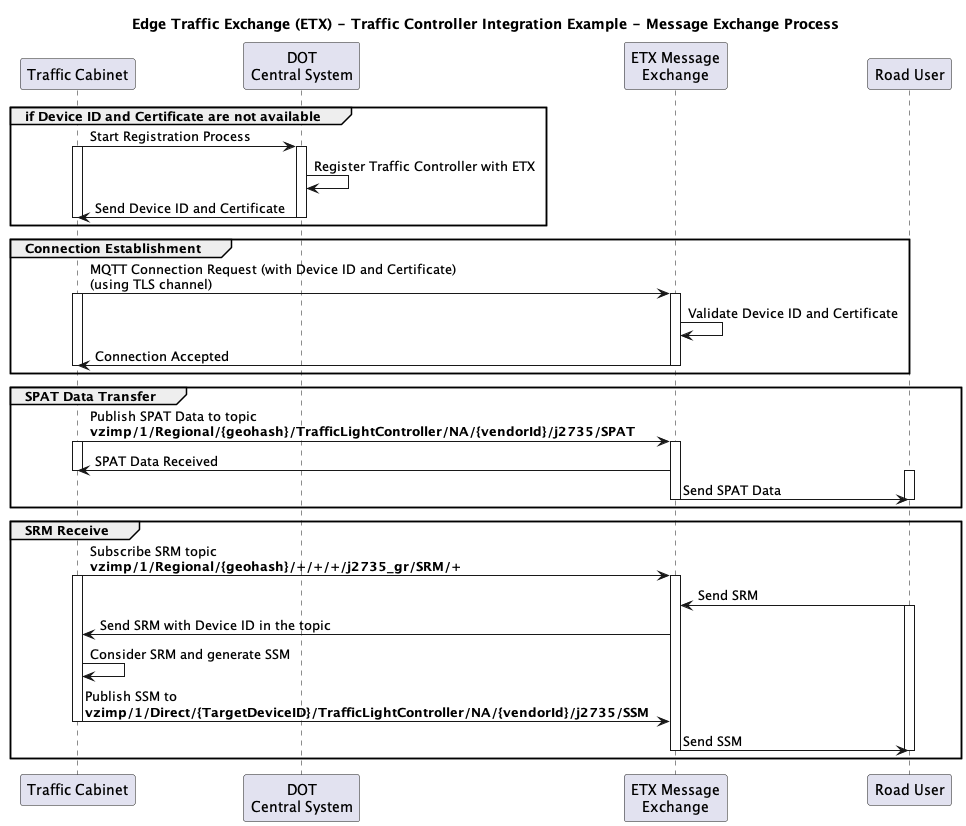
# Edge Transportation Exchange - API Guide <!-- omit from toc --> Edge Transportation Exchange (ETX) is a MEC-based platform with services that leverage the Verizon Wireless network, Hyper Precise Location service and partner data within a virtual roadside unit (vRSU) architecture to create a feature-rich, API-driven Vehicle-to-Everything (V2X) ecosystem. For customers who are not on the Verizon Wireless network, yet; ETX offers all its functionality through the public internet with some compromise on latency. Based on industry standards (SAE, ETSI) and designed for privacy, security, and low latency; ETX delivers intelligent transportation use cases for enterprises such as automotive OEM customers and municipalities/departments of transportation. ETX is a geolocation message routing solution, which allows clients to send and receive messages that are relevant for their location and the surrounding area. In this network-V2X ecosystem ETX allows sending more efficient targeted/unicast messages to clients, instead of the traditional broadcast type communication used by physical roadside units (pRSU). ## Table of Contents <!-- omit from toc --> - [How to Get Started](#how-to-get-started) - [Getting Access to the Edge Transportation Exchange system](#getting-access-to-the-edge-transportation-exchange-system) - [Using the Edge Transportation Exchange system](#using-the-edge-transportation-exchange-system) - [How to Register an Edge Transportation Exchange Client](#how-to-register-an-edge-transportation-exchange-client) - [How to request a connection URL for an Edge Transportation Exchange Client](#how-to-request-a-connection-url-for-an-edge-transportation-exchange-client) - [How to Connect to the Message Exchange (MQTT) layer](#how-to-connect-to-the-message-exchange-mqtt-layer) - [Edge Transportation Exchange Sample Application](#edge-transportation-exchange-sample-application) - [MAP Message Management](#map-message-management) - [Application Configuration Management](#application-configuration-management) - [Overview](#overview) - [Authentication](#authentication) - [Resources](#resources) - [API References](#api-references) - [Examples](#examples) - [Road User Client](#road-user-client) - [Road User Registration](#road-user-registration) - [Road User Message Exchange (MQTT) Access Point Request](#road-user-message-exchange-mqtt-access-point-request) - [Road User Messages Exchange (MQTT) Connection](#road-user-messages-exchange-mqtt-connection) - [Traffic Controller Client](#traffic-controller-client) - [Traffic Controller Registration](#traffic-controller-registration) - [Traffic Controller Messages Exchange (MQTT) Connection](#traffic-controller-messages-exchange-mqtt-connection) ## How to Get Started ### Getting Access to the Edge Transportation Exchange system 1. You'll need to have an enterprise customer profile database (ECPD) account. If you don't have one, reach out to your Verizon Enterprise Account manager to add ETX access to your account. During this step you'll be also added as a Vendor in the ETX system, so your device can use your Vendor ID to send Vendor specific messages through the system. 2. Once your account is created you can create Unified Web Services (UWS) credentials and ThingSpace credentials, which will be needed for your Backend to Register your devices to the ETX system, so they can access the V2X Message Exchange layer. 3. You'll need to create a Backend service, which will allow you to authenticate your devices and work as an intermediary for your device to register in the ETX system. 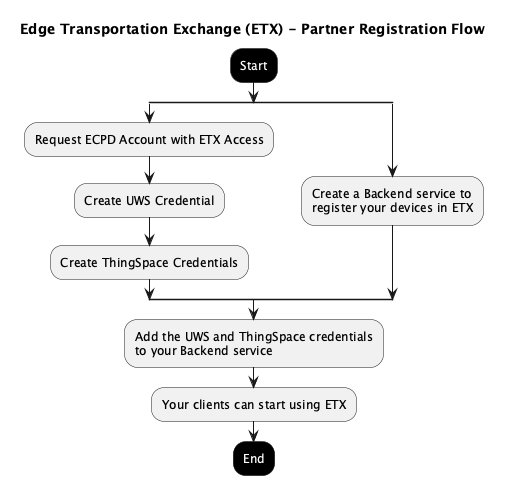 ### Using the Edge Transportation Exchange system Your device needs to 1. Authenticate with your Backend 2. Check if it already has a valid device certificate for the ETX system 3. If the device does not have a valid certificate it needs to call your Backend to Register the device in ETX device. This registration will provide an unique device ID and certificate, which needs to be stored on the device. See the [Registration API Reference](etx/quick-api-reference.md#registration) for details. If the device was already registered a certificate renewal call is enough to get a new certificate. 4. If the device has a valid certificate it needs to call your Backend to ask the ETX system for the right Message Exchange (MQTT) Access URL for your device. 5. Once you have the MEC URL you can use the certificate and the device ID to connect to the Message Exchange (MQTT) and start publishing and/or subscribing to the topics. The Topics are described in [MQTT API Reference](etx/mqtt-api.md). 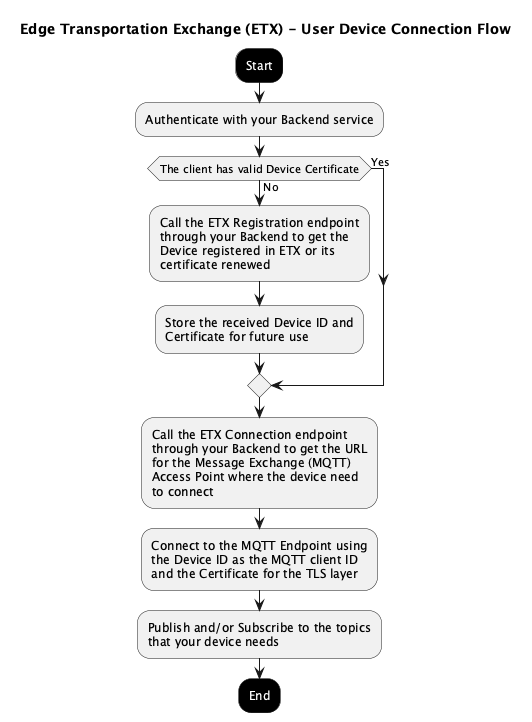 #### How to Register an Edge Transportation Exchange Client This is the flow that your Backend needs to follow in order to register your devices. If you try to register a software application running in the cloud or on the edge, the application itself has to go through the registration process. During the registration process a client specific Certificate and ID is issued. This certificate will be used for authenticating and authorizing your device with the Message Exchange layer. The certificate is issued for several months, and it can be used for an extended time period. This means that the certificate has to be handled carefully, so a wrongdoer cannot abuse the system pretending to be your device. See the [Registration API Reference](etx/quick-api-reference#registration) for details. Please consider this diagram for the different types of errors that you can run into during the registration process. 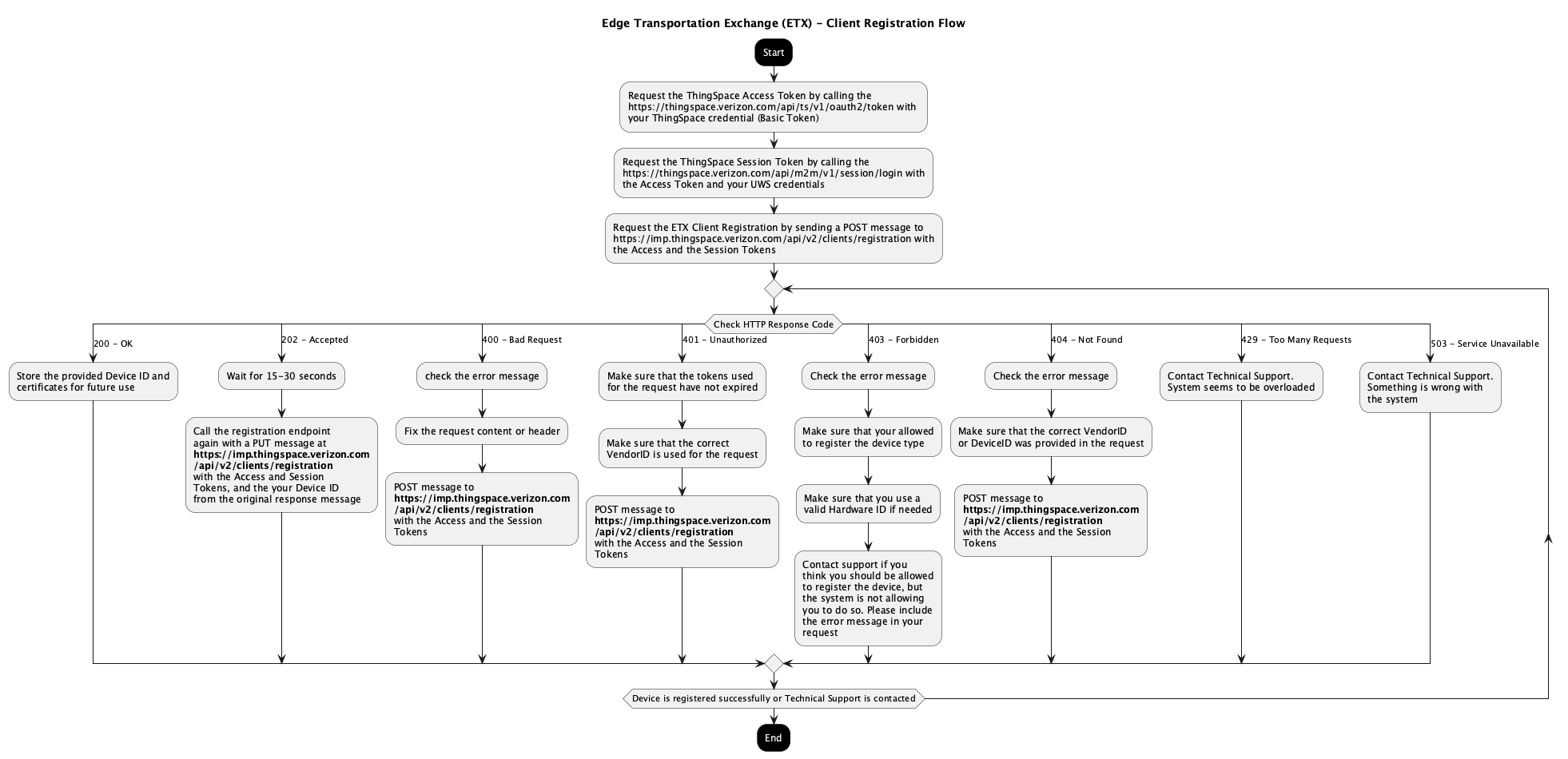 #### How to request a connection URL for an Edge Transportation Exchange Client Once a client is registered it needs to connect to the proper Message Exchange (MQTT) Access Point based on the area (geolocation) where the client is, or in case of software clients the area that it serves. You need to use the same authentication and authorization process for the Client Connection API as for the Registration APIs. See the [Connection API Reference](etx/quick-api-reference.md#registration) for details. 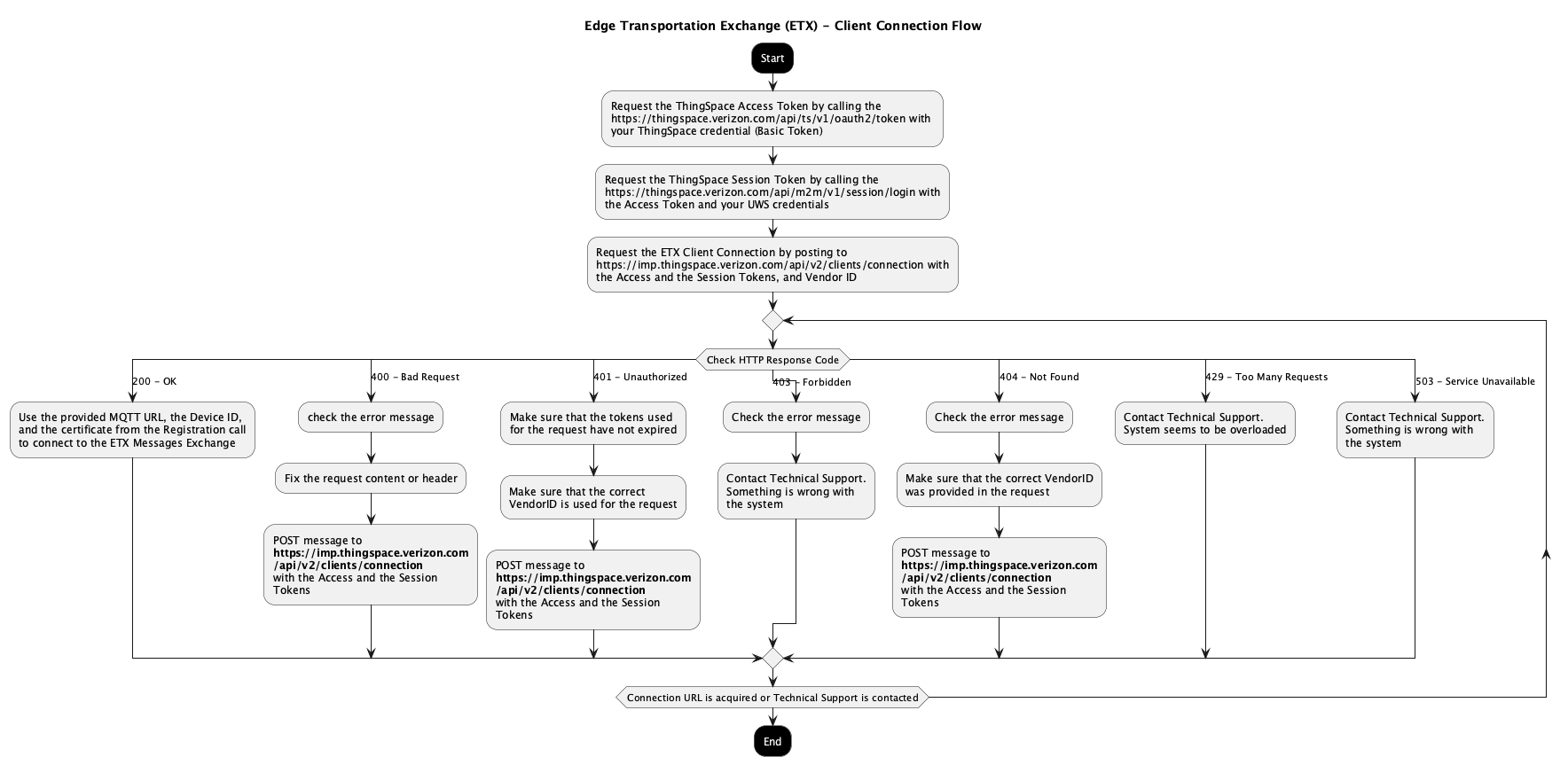 #### How to Connect to the Message Exchange (MQTT) layer Once the client receives the proper connection URL it can establish an MQTT connection to the Message Exchange layer. MQTT Connections details - The ETX system uses MQTT 3.1.1 protocol (v4 in most of the client SDKs). - **The MQTT connection can only be established over TLS 1.2+ using the certificate provided by the ETX Registration service.** - **The MQTT connection requires that the device ID used as the MQTT client ID. The Device ID is provided by the ETX Registration service.** - The ETX system supports QoS 0 and QoS 1 messages, but QoS 0 is preferred for most of the messages. - Please restrict yourself to publish QoS 1 message for messages that are not repeated and has to be delivered only once. - The ETX system does not support QoS 2 messages. - Only clean sessions connections are accepted, so QoS 1 messages sent to the client after it disconnected will not be collected and will not be delivered upon reconnection. - Retained messages are only supported for the `RegionalStatic` namespace and the client is responsible for clearing the retained messages. - Once the MQTT connection is accepted a Session ID is assigned to the client, which can be used to send targeted messages to the client. - The Session ID is only valid for one MQTT session, so when the same client creates a new connection new Session ID will be assigned. - It is recommended to implement the Session ID retrieval code as having the Session ID can help debug any message exchange related issues. The ETX system has an Access Control List (ACL) that defines which clients can publish and subscribe to which topics. The ACL is based on mostly the `VendorId`, but the `ClientType` and `ClientSubtype` parameters can also be considered. - The ACL rules are determined by the agreement between the Vendor and Verizon. - **If a client tries to publish to a topic that it is not authorized to do so, its connection will be terminated.** This is according to the MQTT V3.1.1 protocol. - If a client tries to subscribe to a topic that it is not authorized to do, the subscription request will be denied and the client will receive a `SUBACK` message with a return code of 128 (0x80). This is according to the MQTT V3.1.1 standard. It is important to implement proper error handling on the client side as that is the fastest way to learn about ACL related issues. - If you ran into ACL related issues and you think that it is not compliant with the agreement or you'd like to extend access to the system. Please contact customer support. 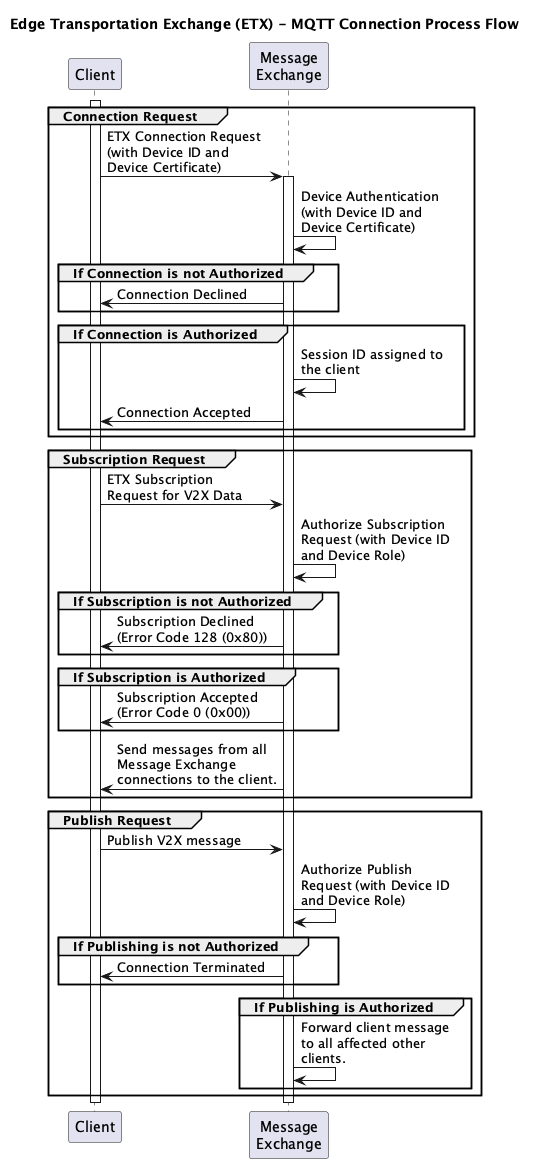 #### Edge Transportation Exchange Sample Application An open-source sample application is available on GitHub to help developers get started with ETX integration. The [ETX Sample Application client](https://github.com/Verizon/EdgeTransportationExchange_SampleClient) demonstrates how to register, connect, and exchange messages with the ETX platform. ### MAP Message Management In the V2X world MAP messages describe the intersection layout that is essential for any use case involving intersections. This includes use cases that are related to Signal Phase and Timing (SPAT) or simply understanding the intersection layout, the number and direction of lanes, and so on. Since MAP messages are changing very infrequently there is a dedicated API to provide and request MAP messages in bulk. This allows the system to store these MAP messages and distribute them as needed. Clients connected to the Message Exchange receive MAP messages in their vicinity based on their MQTT subscription. MAP messages are described in the [SAE J2735](https://www.sae.org/standards/content/j2735_202309/) standard. The MAP Data manager accepts MAP messages in ASN.1 UPER and JER (JSON) formats, but in both cases the structure has to follow the standard. JSON messages in non-standard format are not accepted. The GET API only provides the MAP messages in the official ANS.1 UPER format. You need to use the same authentication and authorization process for the MAP Message Management API as for the Registration APIs. See the [MAP Data Manager API Reference](etx/quick-api-reference.md#map-data-manager) ### Application Configuration Management The ETX Application Configuration service enables you to configure geofence-based applications that deliver V2X messages, warnings, and alerts to road users based on their location and behavior. **For complete implementation details, examples, and best practices, see the comprehensive [Application Configuration Guide](etx/application-configuration-guide.md).** #### Overview The geofencing application allows you to: - Define geographic zones using GeoJSON (LineString, Polygon, MultiLineString, MultiPolygon) - Configure trigger conditions (enter, leave, inside, crossing) - Set speed and heading limits for precise triggering - Send SAE J2735 messages (RSA, TIM), ETSI messages (DENM), or custom messages - Choose distribution strategies: - **Targeted**: Messages sent only to road users who trigger the condition - **Broadcast**: Messages sent to all road users in the geofence area - Schedule message delivery with repeat periods and duration Geofence violations are evaluated at the network edge (MEC) for optimal performance, ensuring low-latency message delivery to vehicles and vulnerable road users. #### Authentication The Application Configuration API uses the same ThingSpace authentication as the Registration API. You need both Access/Bearer and Session/M2M tokens to call these APIs. #### Resources - [Application Configuration Guide](etx/application-configuration-guide.md) - Complete implementation guide with examples - [Application Configuration API Reference](etx/quick-api-reference.md#app-config-service) - API documentation ## API References - [Registration APIs](etx/quick-api-reference.md#registration) - [MQTT APIs](etx/mqtt-api.md) - [MAP Data Manager APIs](etx/quick-api-reference.md#map-data-manager) - [Application Configuration APIs](etx/application-configuration-guide.md) ## Examples An open-source sample application is available on GitHub to help developers get started with ETX integration. The [ETX Sample Application client](https://github.com/Verizon/EdgeTransportationExchange_SampleClient) demonstrates how to register, connect, and exchange messages with the ETX platform. ### Road User Client A road user client would be an ETX client running on board of a vehicle or on a personal device sending BMS/PSM/SRM/etc. messages and listening to alerts, warnings, and other messages coming from the infrastructure: SPAT, MAP, RSA, TIM, SSM, etc. 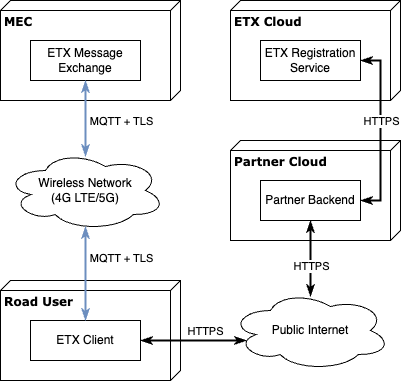 #### Road User Registration In this example the Partner's Backend system goes through the registration process for every Road User device and provide the credentials to the actual devices used by the Road User. 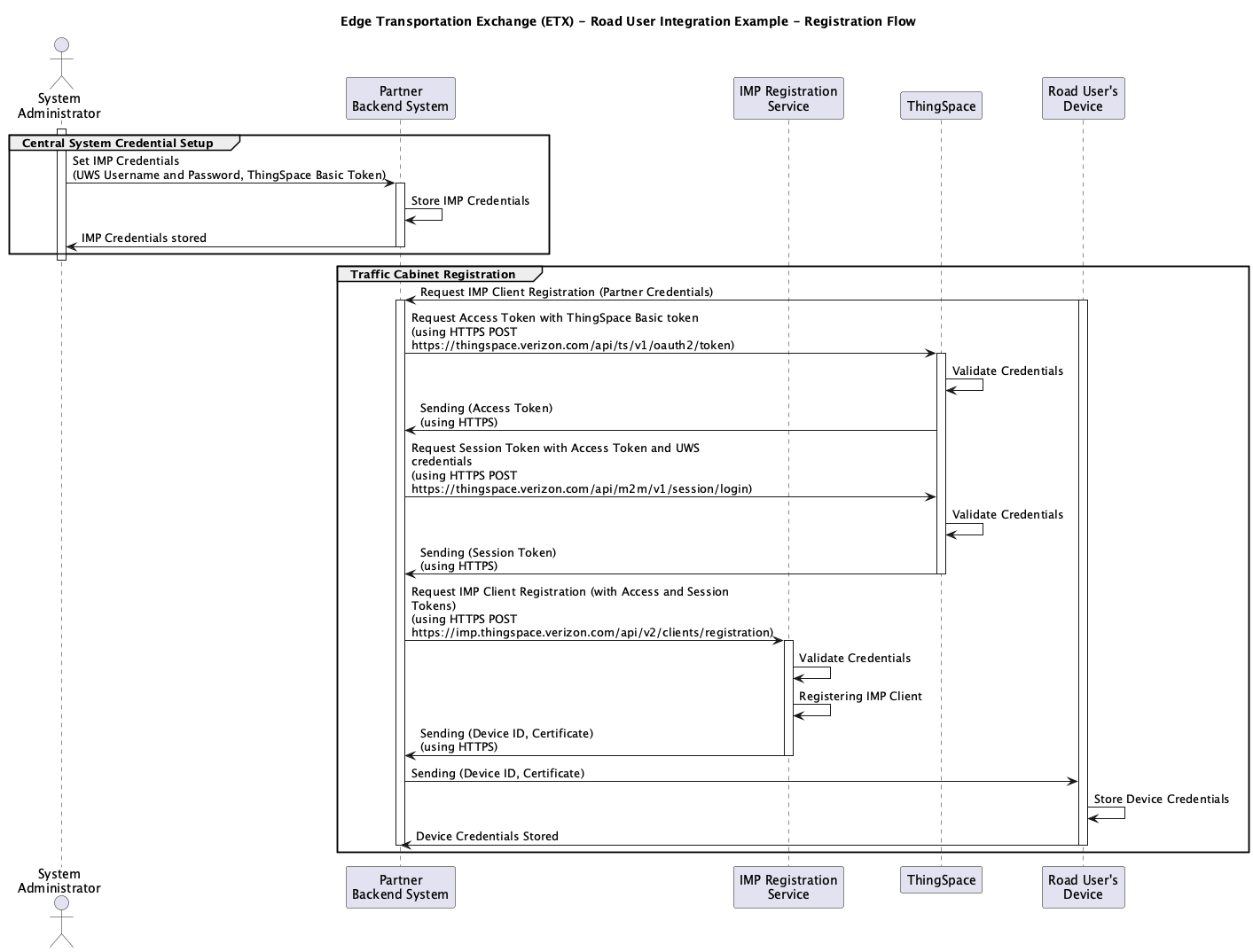 #### Road User Message Exchange (MQTT) Access Point Request Road Users are constantly moving around and can move between different regions in which case the Message Exchange Access Point URL might be different. This mean that ETX's Connection request endpoint needs to be called every time a new connection need to be established. The endpoint requires the same credentials used for the registration endpoint.  #### Road User Messages Exchange (MQTT) Connection Once the [Registration](#road-user-registration) is completed and the [Message Exchange (MQTT) Access Point](#road-user-message-exchange-mqtt-access-point-request) is acquired the road user client can connect start sending and receiving V2X messages through the system. ### Note: We are moving away from the Private topic naming convention and switching to Direct topic. This is being done as the Private topic causes some confusion. There is no direct change to functionality. The only thing that changes is the topic name. Generally road user can: - publish - BSM or PSM messages based on their type to the `vzimp/1/GeoRelevance/{clientType}/{clientSubtype}/{vendorID}/j2735_gr/BSM` or `vzimp/1/GeoRelevance/{clientType}/{clientSubtype}/{vendorID}/j2735_gr/PSM` topic. - SRM messages to the `vzimp/1/GeoRelevance/{clientType}/{clientSubtype}/{vendorID}/j2735_gr/SRM` topic - **BSM or PSM message publishing is required for most road users.** - and subscribe to receive - SPAT and MAP messages on the `vzimp/1/GeoRelevance/+/+/+/j2735_gr/SPAT/+` and `vzimp/1/GeoRelevance/+/+/+/j2735/MAP/+` topics. SPAT and MAP message are sent through the GeoRelevance topic, so the road user will only receive messages in their proximity. - Area based RSA and TIM messages on `vzimp/1/GeoRelevance/+/+/+/j2735/RSA/+` and `vzimp/1/GeoRelevance/+/+/+/j2735/TIM/+` topics. **These are the warnings that are generic for the area. For example, weather warnings.** - Targeted RSA and TIM messages on `vzimp/1/Direct/+/+/+/j2735/RSA/+` and `vzimp/1/Direct/+/+/+/j2735/TIM/+` topics. **These are the messages directly sent to the road user. For example, speeding violation warnings.** - Targeted SSM messages on the `vzimp/1/Direct/+/+/+/j2735/SSM/+` topic. To receive th response for the SRM messages.  ### Traffic Controller Client A traffic controller client would be an ETX client running in a traffic cabinet providing signal phase (SPAT) messages to ETX and receiving signal priority requests (SRM).  #### Traffic Controller Registration In this example the Central Traffic Control system goes through the registration process for every Traffic Cabinet and provides the credentials to the actual devices in the traffic cabinet. Since the traffic controllers are stationary devices the message exchange (MQTT) access point URL will not change for them, so it can be stored and persisted with the Device Certificate and ID.  #### Traffic Controller Messages Exchange (MQTT) Connection The Traffic Cabinet ETX Client would be able to - subscribe - to receive SRM Messages on the `vzimp/1/Regional/{Traffic Cabinet geohash}/+/+/+/j2735_gr/SRM/+` topic. The SRM message would be sent by road user clients through the GeoRelevance topic, so the messages should be in the J2735_gr format. The last section of the topic include the Session ID of the device that can be used to send back the SSM response. - publish - SPAT messages on the `vzimp/1/Regional/{7-digit Geohash where the traffic cabinet is}/TrafficLightController/NA/{vendorId}/j2735/SPAT` topic - SSM response on the `vzimp/1/Direct/{Target Device Session ID}/TrafficLightController/NA/{vendorId}/j2735/SSM` topic. The SSM message are targeted messages to the client who sent the SRM request so other clients in the area would not receive the SSM message.