Callback Best Practices
# Callback Best Practices A callback (also known as a "webhook") has become an industry standard for sharing platform information needing to be relayed back to an application, yet the specific timing upon when this information becomes available is unknown. For example, if a person needed to talk to a physician they might call them on the phone. Instead of holding on the phone (indefinitely) until the physician is free, the person would leave a message providing their callback number, enabling the physician to return their call when available. This is similar to how (and why) a callback works. An application registers a URL endpoint so the platform may return information when processing has completed (versus keeping an open connection and waiting for an indefinite amount of time). Verizon uses callbacks to help optimize communication between its platform and your application. While some API’s are asynchronous, which require the use of callbacks (such as activating up to 10,000 devices at once), other API’s are able to provide a synchronous (near instant) response. Synchronous responses such as [/devices/actions/list](/docs/standard-apis/connectivity-management/api-endpoints/device-management/list-current-devices-prl-version/retrieve-device-prl-information) will return the status of devices on an account when the API is called since the response only takes seconds to process. Asynchronous responses such as [/devices/actions/activate](/docs/standard-apis/connectivity-management/api-endpoints/device-management/activate-service-for-devices/activate-service-for-devices) will return a tracking identifier (**RequestID**) synchronously and then later return the full response via your registered callback URL (webhook) service since processing time is greater than several seconds (and may vary based on server load and / or how many devices were included with the request). **NOTE:** The callback data will include the **RequestID** for tracking purposes. The below image shows the ladder logic of both synchronous and asynchronous (callback) returns: 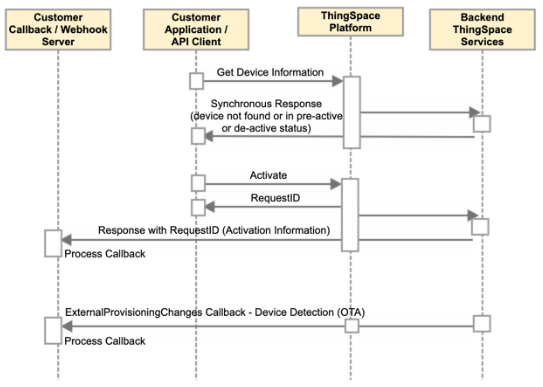 In addition to the above, one other great use of callbacks is to notify of changes to the platform that were outside of an API event. For example, if registered for the `ExternalProvisioningChanges` callback, this prompts traffic from Verizon to a URL endpoint notifying a user when changes to a device are processed outside of the API communication method (such as when someone calls in to manually deactivate a line of service). Another example might be if a support staff logs into the ThingSpace web portal and changes a custom field manually, the application (or platform) would likely be out of sync with ThingSpace unless it were to receive the `ExternalProvisioningChanges` callback informing the application manager to update the changes to the line. This helps keep the platform up to date with the latest information. A number of other callback services are available. Further information is available at the page to [Register a Callback Listener](https://thingspace.verizon.com/documentation/apis/connectivity-management/api-reference/register-callback-listener.html). It is recommended at a minimum to register for `CarrierService` and `ExternalProvisioningChanges`. For a more thorough explanation of what to check for during an activation, see [Activation Best Practices](page: thingspace-connectivity-management\getting-started\best-practices-for-activation.md). ## Setting up a Callback Service **NOTE:** If unable to utilize callbacks at this time, it is recommended to log in to the ThingSpace web portal and review the Logs for any processing information. Prior to launching a full production callback, it may be easier to set up a temporary callback endpoint with a service such as [https://webhookrelay.com/](https://webhookrelay.com/), or [https://webhook.site/](https://webhook.site/). Talk to your Verizon Developer Relations Engineer for further options *Please be aware that Verizon neither endorses nor recommends these sites*. They are only provided as an example. Be sure to deregister the test callback URL before registering a new production callback endpoint. At this time only callback endpoint may be registered per service per account. If sending callbacks to multiple endpoints is required, the responses will need to be stored and forwarded or a service such as [https://webhookrelay.com/](https://webhookrelay.com/) used (*Neither endorsed or recommended by Verizon. Just an example.*). [Setting up a callback service](https://thingspace.verizon.com/documentation/get-started/tutorials-videos/callback-services.html) (see link for video) will require the endpoint to accept unsolicited inbound traffic. First register the URL of the callback web service with Verizon so that Verizon knows where to send the data. **NOTE:** There may be firewalls that restrict inbound traffic that need to be managed on the network being used. Below is a diagram for reference, along with the IP addressing from Verizon, that will need to be permitted; please see [Register a Callback Listener](https://thingspace.verizon.com/documentation/apis/connectivity-management/api-reference/register-callback-listener.html) for the latest listing of IP addresses. 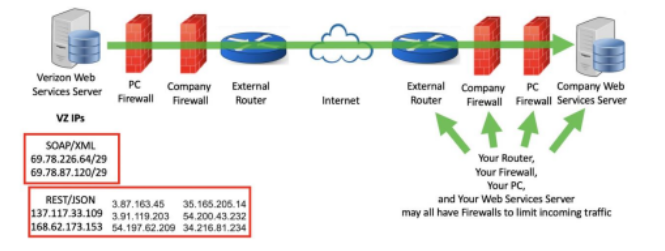 If needed, work with your IT Dept. to determine the path through your network to your web service. Be sure the web server’s firewall allows incoming traffic from Verizon on the port registered; when a callback is registered, Verizon only allows the following ports: - 80 - 443 - 9001-9006 - 50551-50559 - 28200-28220 Register the correct URL or IP address and port. Be sure the URL or IP address is a publicly accessible IP address. ## Registering for Service There are multiple services that can be registered for. Be sure the correct service for the API set is being registered for. Each account can register for one, many or all of the Verizon API callback services available, depending on what information is required to receive. The username/password section is not a login mechanism (this information is sent with the callback to help with processing). It is sent in clear text; do not put any information in that should not be seen by others. Be sure the registered service knows where to look and what to do with the username and password when it is received. Consider first testing without the username/password. If https is used, have a valid certificate registered with a legitimate certificate authority. A self-signed certificate will not work. ## Testing the callback service - Register the `CarrierService` callback to the account. This is the same callback used for activations. - To generate API calls that are fast and require minimal processing by Verizon use `CarrierService/ChangeDeviceCustomFields` - Change a custom field not actively being used - Consider using a variable such as time and date as the field being changed so it is easily recognizable as a change - Before trying HTTPS, or if HTTPS fails, try HTTP first as it removes one complexity - Remember to unregister the HTTPS URL and register the HTTP URL or vise-versa depending on testing ## SFAQ: Semi-Frequently Asked Questions **Q: The callbacks don’t include the account number on which the callback was triggered; is there any easy way to know which account the callback is coming from if I work with multiple accounts?** Yes! When you register a callback, there is an option for a username and password, which is used for your callback endpoint application to verify against. Most users do not use these fields as the best approach is to use HTTPS (along with a certificate) as an endpoint which has overall better security. Thus, the username field can be used when registering a new callback for anything. So, one could enter the account number inside of the `username` field so that each time a callback is received, the account number would be included within the `username` field for that specific callback type on that account. A user could also use the `password` field for anything else included with the callback. Keep in mind that the `username` and `password` fields are clear text if HTTPS is not being used.

