Overview
# Overview <Card title="Quick API Reference" url="/docs/standard-apis/connectivity-management/api-reference"> Explore Connectivity Management API endpoints </Card> ## Connectivity Management 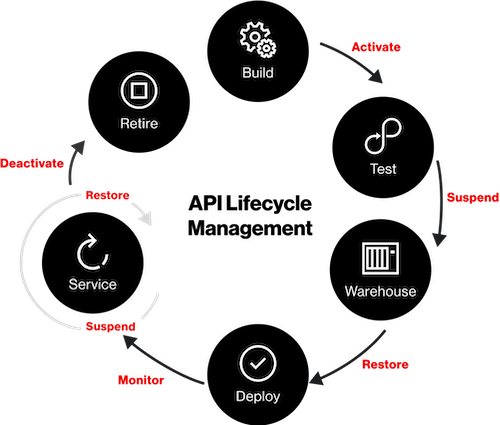 The ThingSpace Connectivity Management API allows you to add and activate devices, check their status, monitor their usage, monitor their reachability for Data and SMS communication as well as their connection status, and perform other device connectivity management tasks through a RESTful API. You can use the API to add connectivity management to anything from small apps to enterprise software systems, such as enterprise resource planning (ERP), supply chain management and customer service management. The API provides a secure, standards-compliant REST interface to the web services at the ThingSpace Data Center. You can also view and manage devices by logging in to the [ThingSpace Manage portal](https://mblogin.verizonwireless.com/account/business/login/unifiedlogin?goto=https%3A%2F%2Fthingspace.verizonwireless.com%2FPortal%2Fmanage%2Fdashboard&appGroup=EPR) available through your [Verizon Enterprise Solutions](https://www.verizon.com/business/solutions/enterprise/?adobe_mc_sdid=SDID%3D1504C641C778429A-5EF7F73D0B024A3F%7CMCORGID%3D7ED836675AB3A4860A495CAD%40AdobeOrg%7CTS%3D1669286693), [Verizon My Business](https://mblogin.verizonwireless.com/account/business/login/unifiedlogin?session=n&goto=https%3A%2F%2Fbusiness.verizon.com%2F), or your ThingSpace IoT Developers Marketplace account. ## ThingSpace Connectivity Management API for ThingSpace IoT Developers After completing the steps in the “Getting Started with ThingSpace APIs” in the Getting Started section, you can use Connectivity Management APIs to do the following: - Start and end Connectivity Management sessions - Activate, deactivate, and delete devices - Retrieve device usage history - Send and retrieve SMS messages - Register callback URLs - Get account information - Get device location and location reports - Schedule firmware upgrades
