About Callback Service
# About Callback Service ## Overview The ThingSpace Device Location API can send these callback messages to your application: - Location: A notification when an [asynchronous device location report](/docs/premium-apis/device-location/api-endpoints/devices-locations/createlocationreport) is ready to be [retrieved](/docs/premium-apis/device-location/api-endpoints/devices-locations/retrievelocationreport), or a different notification when monthly usage reaches a set [trigger point](/docs/premium-apis/device-location/api-endpoints/usage-trigger-management/createnewtrigger) - DeviceLocation: The locations of devices from [`POST /devicelocation` requests](/docs/premium-apis/device-location/api-endpoints/devices-locations/listdeviceslocationsasynchronous) Callback messages are REST messages that are POSTed to the URL endpoint specified in a [`POST /callbacks` request](/docs/standard-apis/connectivity-management/api-endpoints/connectivity-callbacks/register-callback/registercallback). You are responsible for creating and running a listening process on your server at that endpoint to receive and parse the messages. ## Receiving Asynchronous API Callbacks For API requests that require significant processing time, such as getting the current location of thousands of devices, the Device Location API replies first with a synchronous response that simply acknowledges the request and allows your application to continue processing. Later, the platform sends one or more asynchronous callback messages, reporting the results of the request. 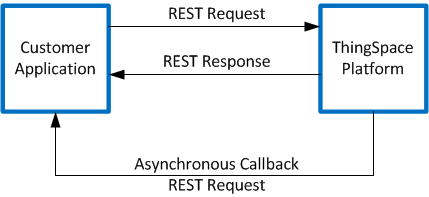 The synchronous response contains a unique Transaction ID. The callback messages will contain the same Transaction ID so that you can associate the callback with the original API request. **NOTE:** No callback is sent for a `POST /locationreports` request for cached location information (cacheMode=0) because the report is available immediately. ## Subscribing to Callback Services To receive callback messages, you will need to create and deploy a web service that can validate and process REST messages that conform to the [callback JSON schema](/docs/premium-apis/device-location/getting-started/about-callback-service#device-location-report-callback-json-schema). You then need to [register the URL of your web service](/docs/standard-apis/connectivity-management/api-endpoints/connectivity-callbacks/register-callback/registercallback) so that ThingSpace knows where to send the callback messages. NOTE: You will have to provide a way through your firewalls for the callback messages, such as by whitelisting the IP address used by the Verizon ThingSpace servers. That address is 68.128.212.217. NOTE: To test your callback listening services in a non-production environment, you must have an external URL for the computer or server that is hosting the web services. ThingSpace cannot send callback messages to a system that does not have a URL. ## Callback Security Callback messages sent by the Device Location API use a shared secret key and HMAC signatures (SHA256) to let you verify the authenticity and integrity of the messages. 1. When you register to receive callback messages, the response will contain a “Shared-Key” in the header, like this: \ `Shared-Key: "020c9ad3-077c-4ab3-979a-2c6184599498"` 2. You must save the shared key to use when validating messages. 3. Callback messages sent by ThingSpace will have a SHA256 MAC signature in the header: \ `"Mac": "43bb65d2987acfbc992ef435b9155aef1608d619e56b5b024a066437eebda462"` 4. You can use the shared key to authenticate and validate the message payload. Note that you must ensure that the payload is formatted without any extra spaces and with keys sorted in alphabetical order to get the same MAC from the SHA256 algorithm. For example: \ ```json { "aname": "0252078987-00001", "expiryDate": "2018-04-01", "status": "COMPLETED", "txId": "2c90bd28-ece4-42ef-9f02-7e3bd4fbff33" } ``` To increase security when receiving callback messages from ThingSpace, you can implement these protocols: - Enable white-listing on your firewall or front-end server and add the ThingSpace IP address (68.128.212.217) to the white list. This will allow your servers to reject requests from other IP addresses. - Install a one-way certificate and enable HTTPS. You must use a certificate from a third-party certificate service; a self-signed certificate will not work. ThingSpace will check the validity of the certificate at the start of every session. ## Device Location Report Callback JSON Schema Notification that a Device Location report is ready conform to this structure: ```json { "aname": "string", "txId": "string", "status": "string", "expiryDate": "date-time string" } ``` ### Example Device Location Report Callback ```json { "aname": "0252078987-00001", "txId": "2c90bd28-ece4-42ef-9f02-7e3bd4fbff33", "status": "COMPLETED", "expiryDate": "2018-04-01" } ``` ### Device Location Report Callback Parameter Definitions | Parameter Name | Data Type | Description | | -------------- | --------- | ----------------------------------------------- | | aname | string | The account name in the format ##########-##### | | txid | string | Unique ID of the request | | status | string | COMPLETED | | expiryDate | string | Date when the report will be deleted | ## Usage Alert Callback JSON Schema Usage alerts conform to this structure: ```json { "accountNumber": "string", "currentDate": "string", "maxAllowance": "string", "rawUsage": "date-time string", "service": "string", "thresholdPercValue": "string" } ``` ### Example Usage Alert Callback ```json { "accountNumber": "0252078987-00001", "currentDate": "2018-08-24T17:46:24 UTC", "maxAllowance": "5000", "rawUsage": "4501", "service": "Location", "thresholdPercValue": "90" } ``` ### Usage Alert Calback Parameter Definitions | Parameter Name | Data Type | Description | | ------------------ | --------- | ------------------------------------------------------------------------------------------------------ | | accountNumber | string | The account name in the format ##########-##### | | currentDate | string | The time stamp of when the callback was sent. | | maxAllowance | string | The purchased monthly subscription allowance | | rawUsage | string | The number of service transactions at the most recent daily check | | service | string | The name of the ThingSpace service | | thresholdPercValue | string | The percent of the monthly subscription allowance at which this alert is sent, defined in the trigger. |
